
Forum Replies Created
-
AuthorPosts
-
There are 2 cases in creating transfer function depending on your setup.
Case1: Geometric transfer function
The position and the number of microphones that actually exists must be set in the HARKTOOL’s channel list. Since ReSpeaker Mic Array only has 4 microphones, it will create a 4-channel transfer function.Case2: TSP transfer function.
The number of microphones used must be set in HARKTOOL’s channel list. But since the TSP sound recorded by ReSpeaker Mic Array has 6 channels, the WAV files input to HARKTOOL must exclude 0 and 5 channels beforehand. To do this, for example if you use a tool called ‘sox’, this can be done by executing the following command:sox input.wav output.wav remix 2 3 4 5Note that the channel number starts with 1 in sox, while in HARK it starts with 0.
In HARK, the 6 channels of data coming from AudioStreamFromMic can be filtered by using the ChannelSelector node in configuring the channels needed.
https://www.hark.jp/document/hark-document-en/subsec-ChannelSelector.html
In your case, if you want to use the 2nd, 3rd, 4th, and 5th channels, you can set
<Vector<int> 1 2 3 4>in the ChannelSelector’s SELECTOR parameter.お問い合わせありがとうございます。
新規ノードの作成については前提となる知識が多いため、
大変申し訳ございませんが詳細な説明は省かせていただいております。代わりに、HARKでは必要な機能を実現するための仕組みとしてPythonを採用しております。
hark 3.0.4でしたら、HARK-Python3というパッケージをインストールして頂くことで
ご自分で作成したPyhonコードをHarkで実行可能です。英語になりますが、以下のページに説明がございます。
https://www.hark.jp/document/packages/hark-python3/harkpython3.html・上記ページのGoogle翻訳結果
https://translate.google.com/translate?hl=ja&sl=en&tl=ja&u=https%3A%2F%2Fwww.hark.jp%2Fdocument%2Fpackages%2Fhark-python3%2Fharkpython3.htmlまた、以前のバージョンになりますが、
HARK-Pythonについてのやりとりがございますのでご参照いただければと思います。
https://wp.hark.jp/forums/topic/hark-pythonについて/—
また、クックブックについては、最新の状況に更新できておらず
ご不便おかけしてしまい申し訳ございません。ソースコンパイルからインストールする方法については
下記ページの Installation from Source Compilation 以降をご参照ください
https://www.hark.jp/install/linux/以上、よろしくお願いいたします。
Hello,
Thank you for your inquiry.When creating a transfer function, microphone array configuration starts from 0.
So selecting the channels as 0,1,2,3 is correct.
This will use the four-channel stream created from channels 1, 2, 3, and 4.Best Regards.
お問い合わせありがとうございます。
こちらで、複数のTAMAGOを使用して確認したのですが現象再現しませんでした。
発生時の環境は実機でしょうか。
仮想マシンで実行した場合は、処理に遅延が発生して音飛びする可能性がございます。また、実行中にWindows Updateが発生した場合も音飛びが起こりますので、
現象発生時の状況をご確認いただけますでしょうか。以上、よろしくお願いいたします。
お問い合わせありがとうございます。
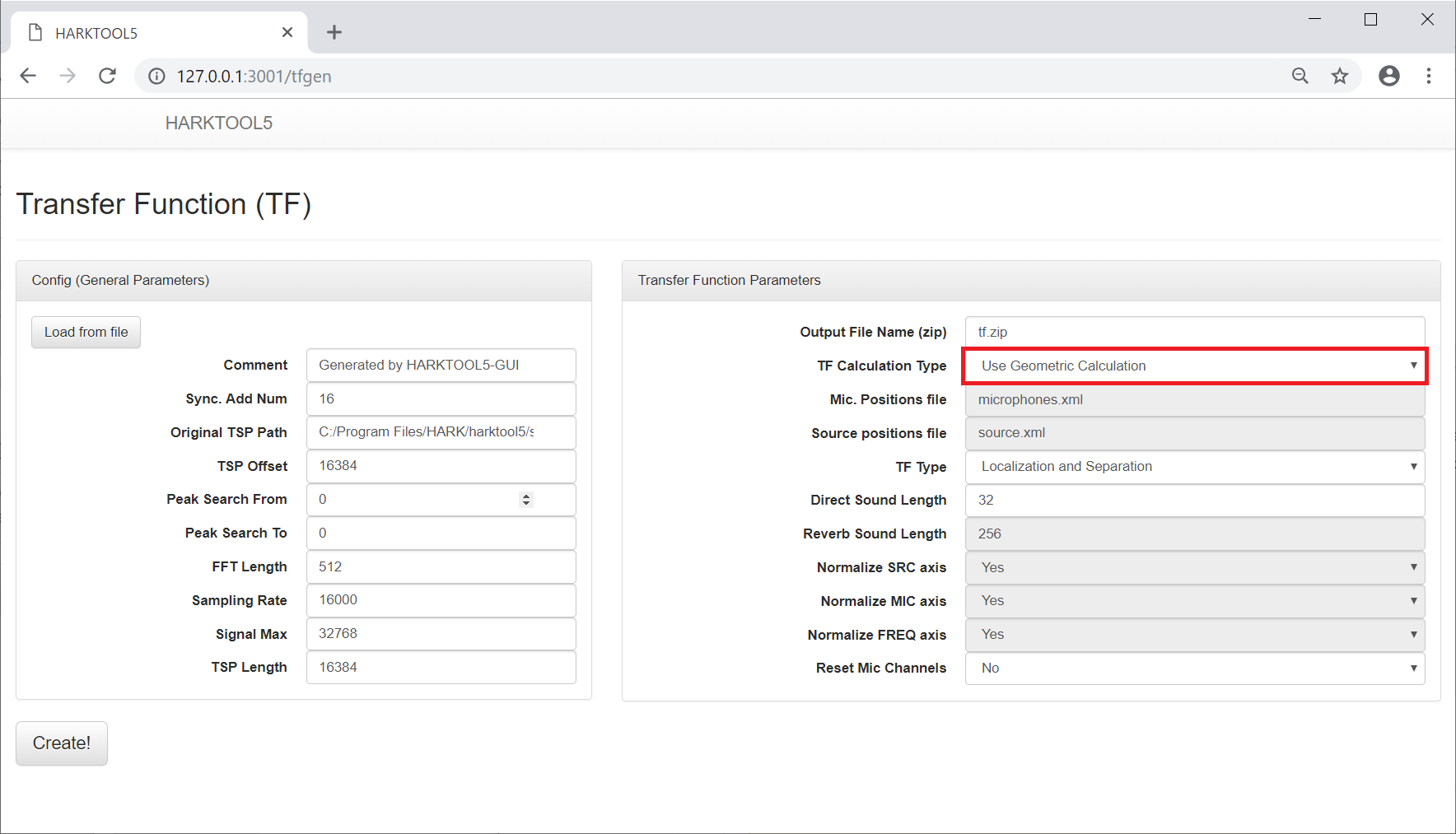
幾何計算による伝達関数作成の際、Position TypeのDefault設定はtspとなっておりますが
Sound Sourceでも作成は可能です。
#671で回答したように、
「TF Calculation Type」の設定を「Use Geometric Calculation」とすることで、幾何計算による伝達関数が作成されます。(添付画像)詳細な生成方法については、下記URLをご参照いただければと思います。
ただし、TAMAGOを想定した記述のため、マイクアレイの座標は御自身の環境にあわせて変更していただく必要がございます。
・Google翻訳
https://translate.google.co.jp/translate?hl=ja&sl=auto&tl=ja&u=https%3A%2F%2Fwww.hark.jp%2Fdocument%2Ftf%2Fgeometric-calculation-based_tfg_tamago%2FGeometric-calculation-based_TFG_for_TAMAGO_using_HARKTOOL5.html以上、よろしくお願いいたします。
Attachments:
お問い合わせありがとうございます。
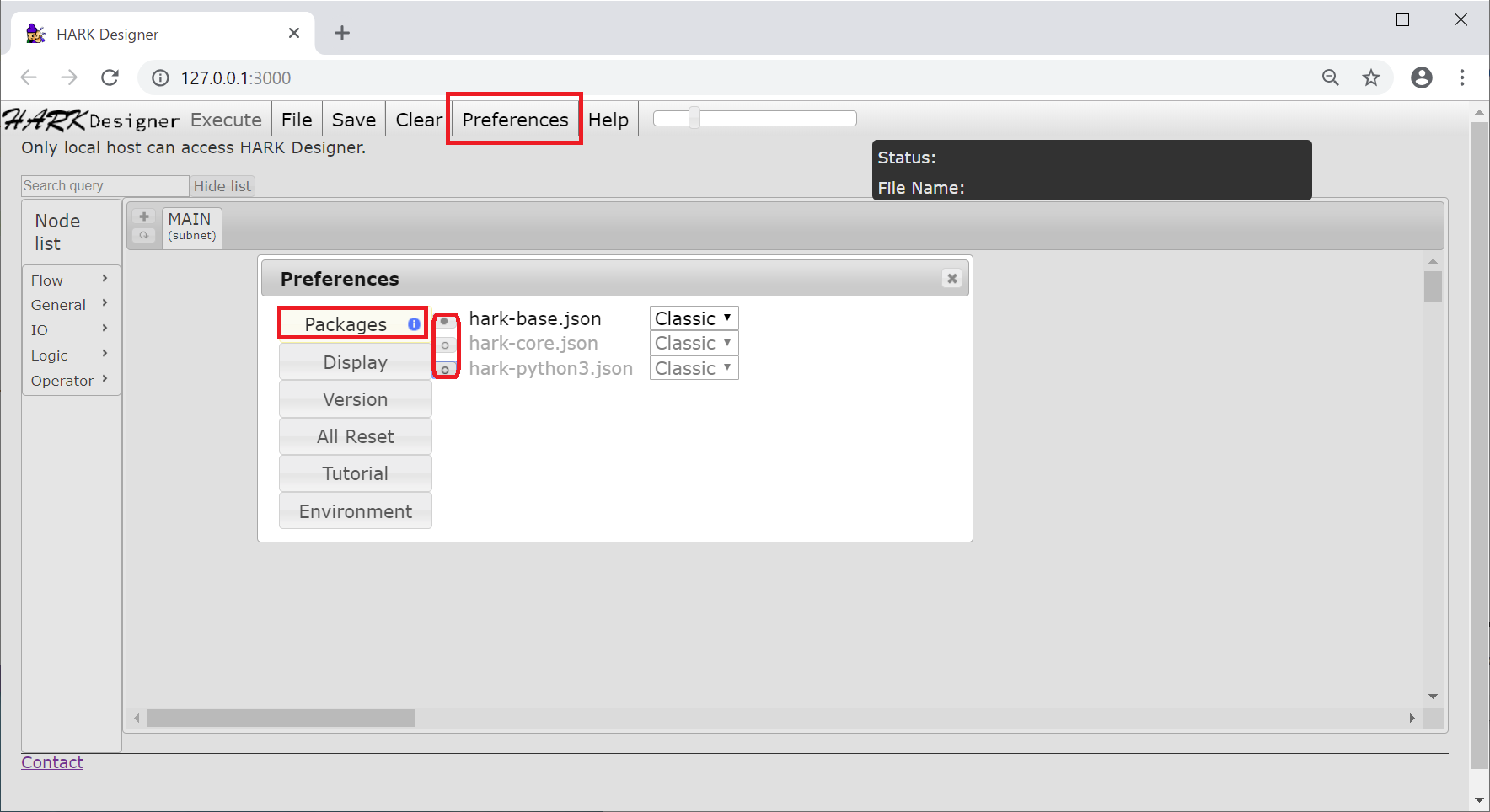
Node listの表示ですが、
添付画像のように
PreferenceメニューのPackagesから使用するパッケージを選択していただく必要があります。また、HARK Designerについては下記URLに説明がありますので、
参考いただければと思います。
https://www.hark.jp/document/packages/hark-designer-ja/harkdesigner.html以上、よろしくお願いいたします。
Attachments:
-
AuthorPosts